
Back up and transfer Baidu files
Air Explorer, the multicloud manager
Baidu
Baidu is a leading Chinese technology company specializing in Internet-related services and products, including search engines, artificial intelligence, and cloud computing. Baidu Cloud offers robust cloud storage solutions like Baidu Object Storage (BOS), which provides scalable, secure, and efficient storage for various data types. It ensures high availability and durability, making it a reliable choice for both personal and business use. Transferring files between Baidu and other cloud services is simplified with Air Explorer, which also boosts backup speeds to your computer.

2TB free storage space
Baidu Cloud offers a substantial amount of free storage space, making it an attractive option for both individuals and businesses.
Cross-platform compatibility
Baidu Cloud supports various operating systems, including Windows, macOS, Android, and iOS.
Collaborative tools
Baidu Cloud includes built-in tools for file sharing and collaboration, enabling users to work together on projects in real-time.
Security measures
Baidu Cloud prioritizes the security of user data with robust encryption and authentication measures.
Functions of Baidu in Air Explorer
Air Explorer is an application designed to manage various cloud storage services and facilitate the transfer of data between them. You can add Baidu to enjoy more functions provided by Air Explorer. Please download and test it.
Backup PC to Baidu
With Air Explorer, you can seamlessly back up your files from your PC to Baidu, guaranteeing both secure storage and simple retrieval.
Synchronize from Baidu to other clouds
Air Explorer supports transferring files between the major cloud storages, including Baidu, and also provides a seamless way to keep folders in sync with your local computer.
Encrypt files in Baidu
Air Explorer’s file encryption guarantees security and protection from unauthorized changes for files stored in Baidu.
SEARCH FILES IN Baidu
Air Explorer’s Baidu search tool simplifies your cloud navigation, allowing for quick file retrieval and easy file location.
Command Line with Baidu
Employ the command line interface to handle backup, synchronization, and file management chores in Baidu.
Schedule Baidu backups
Using Air Explorer, you can schedule regular cloud syncs to maintain data consistency, safeguard against data loss, and enhance your backup plans.
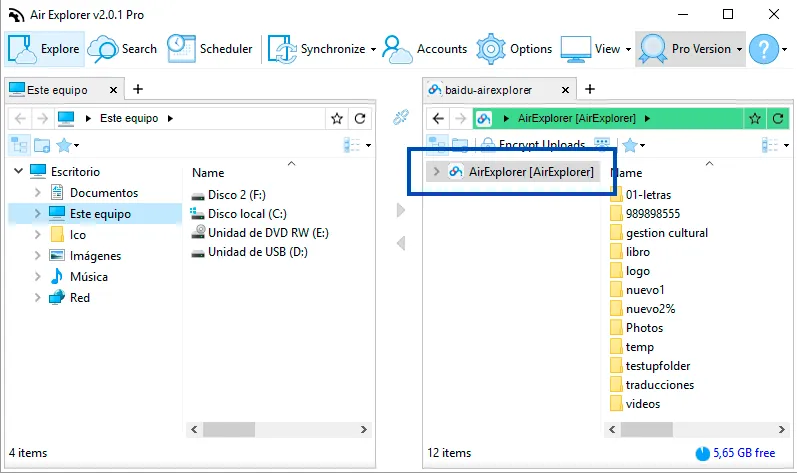
The Baidu folder used by Air Explorer
Because of a Baidu limitation, Air Explorer can access only the folder associated with the application. Files outside that folder are not shown in Air Explorer.
Set it up or fix access
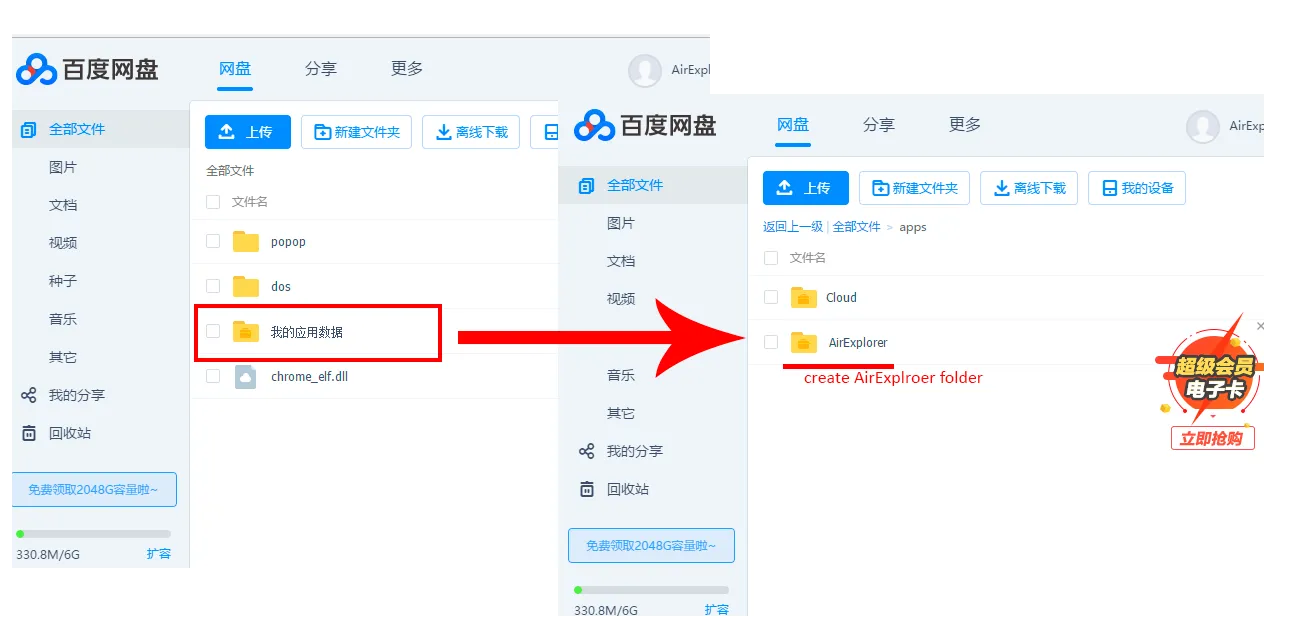
- When you add the account, Baidu normally creates the AirExplorer folder automatically.
- The folder is located in Baidu Application Data (全部文件). Store there the files that you want to manage with Air Explorer.
- If the folder was not created, create it manually. If it already exists but access fails, delete that folder, remove the Baidu account from Air Explorer and add it again.
Storage services supported by Air Explorer
With Air Explorer, manage the transfer, synchronization and security of your data across more than 40 cloud storage services.


