
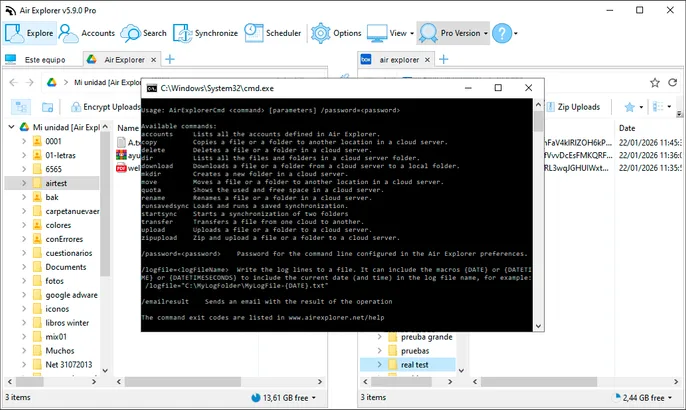
Air Explorer’s CLI unlocks scriptable cloud management: synchronize folders between services, transfer data between PC and cloud, encrypt uploads or generate backups, all from command prompt, batch files or integrated workflows. Perfect for developers, IT admins or anyone needing reliable automation without the GUI.
Get started with the command line
- Open Options and enable Command Line Support; it is available in Air Explorer Pro.
- Open the command-line help from Tools or View to check the available commands and their parameters.
- Set a command-line password if you need to protect automated access, then include it when running commands.
- Test each command with a small folder or saved task before using it with important data.
- Once it works as expected, save it in a .bat or PowerShell script and schedule it when needed.
Common command-line workflows
These Windows examples use account aliases and paths in quotes. Replace them with your own values, then test with a small folder first.
List connected accounts
AirExplorerCmd.exe accountsUse the displayed aliases in the cloud commands that follow.
List a folder
AirExplorerCmd.exe dir "My cloud" "/Projects" /bShows a simple list of the items in the selected cloud folder.
Search files
AirExplorerCmd.exe search "My cloud" "invoice" /folder="/Projects"Searches for a term within a cloud folder and its subfolders.
Upload a local file
AirExplorerCmd.exe upload "C:\Work\report.pdf" "My cloud" "/Reports"Uploads a local file to the destination folder in a connected account.
Transfer between clouds
AirExplorerCmd.exe transfer "Source cloud" "/Reports/report.pdf" "Destination cloud" "/Archive"Copies a cloud file directly from one connected account to another.
Run a saved sync
AirExplorerCmd.exe runsavedsync "Nightly backup"Runs a synchronization task already saved in Air Explorer.
Common parameters
/password=<password>- Use it when you configured a command-line password in Air Explorer.
/logfile="C:\Logs\air-explorer-{DATE}.txt"- Writes the operation log to a file; the date macro creates a separate log each day.
/emailresult- Sends the result of the operation by email when email is configured.