
Top No-Code Cloud Sync Tools: Air Explorer for Multi-Cloud
April 21, 2026
In 2026, enterprises juggle AWS S3 for cost-effective storage, Google Cloud Storage for AI workloads, Azure Blob for enterprise compliance, and collaboration tools like OneDrive and Dropbox. This multi-cloud reality creates data silos, egress fees, and endless manual transfers that waste weeks of productivity. Air Explorer eliminates this chaos with drag-and-drop synchronization across 40+ providers from one intuitive interface. No CLI scripts. No vendor lock-in. Just visual cloud-to-cloud workflows that scale from GBs to TBs seamlessly.
Why No-Code Cloud Sync Matters
Multi-cloud strategies dominate: 89% of enterprises use 2+ cloud providers, splitting workloads across S3 for cheap object storage, GCS for AI datasets, and OneDrive for team collaboration. The result? Fragmented data that kills productivity. Traditional CLI tools like rclone fail on network interruptions, require constant debugging, and demand DevOps expertise most teams lack.

Manual transfers via web consoles take days for terabyte-scale datasets. Data mobility now ranks as the #1 multicloud pain point for 68% of enterprise leaders. The business stakes are high: slow sync delays AI training, compromises disaster recovery, and locks teams into expensive vendor ecosystems.
Air Explorer solves this with visual reliability. Non-technical marketing teams sync campaign assets. Data engineers focus on ML pipelines instead of transfer scripts. IT admins achieve enterprise-grade automation without coding. Fast, reliable sync across clouds = faster business decisions.
Air Explorer’s Sync Engine
Air Explorer’s interface feels like Windows Explorer on steroids: dual-pane views show all 40+ clouds simultaneously. Drag folders from Dropbox to S3 or OneDrive to Azure Blob instantly. No terminal windows. No JSON configs. Just point, click, sync.
Five precision sync modes cover every workflow:
- Mirror: Creates exact replicas – perfect for backups and disaster recovery
- Mirror Update: One-way sync with deletions (source deletions propagate)
- Update: Additive sync only – preserves existing target files
- Bidirectional: True two-way sync for collaboration folders
- Custom Rules: Exclude patterns (logs, temp files), preserve timestamps, size filters
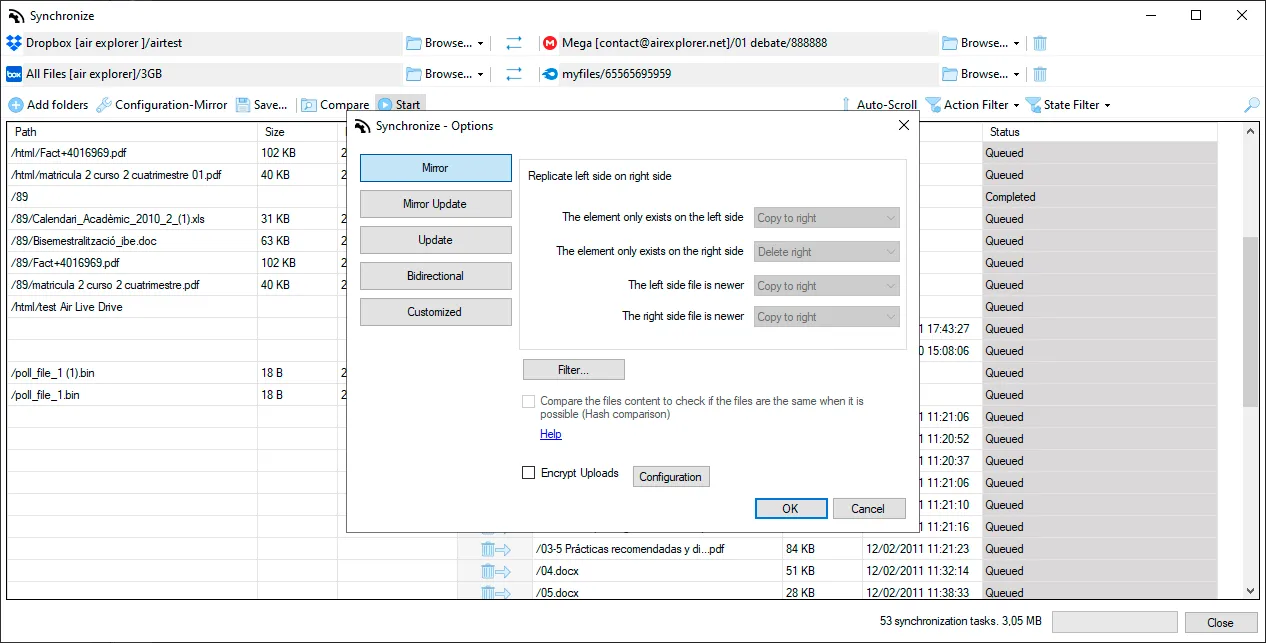
Multi-task orchestration runs 15+ sync jobs concurrently: S3→Azure while OneDrive→GCS runs in parallel. Each task gets individual progress bars, speed graphs, and real-time logs.
Enterprise reliability features:
- Auto-resume after network drops
- Smart conflict resolution (timestamp or size-based)
- Bandwidth throttling for business hours
- Client-side AES encryption option
| Feature | Business Value |
|---|---|
| 40+ Cloud Support | One tool manages entire ecosystem |
| Drag & Drop UI | Teams sync TBs without training |
| Background Processing | Set schedules, focus on core work |
| Real-time Monitoring | Instant visibility, no guesswork |
Your First Multi-Cloud Sync
Complete the workflow in 5 minutes:
- Launch Air Explorer → Connect clouds using direct credentials
- Dual-Pane Navigator → Left: Source (OneDrive “Marketing_Assets”) → Right: Target (S3 “prod-bucket”)
- Choose Mode → “Mirror Update” → Optional filters (exclude *.tmp, >100MB)
- Execute Sync → Real-time dashboard
- Automate → Schedule daily 2AM sync → Enable email alerts + conflict notifications
Pro tip: Always enable “Preserve timestamps and permissions” for version control systems, legal holds, or audit requirements. First 100GB transfers run at maximum speed to benchmark your pipeline.
The result: OneDrive folder now mirrored to S3 with pixel-perfect fidelity. Zero coding. Zero failed transfers.
Advanced Features for Scale
Server-grade transfers use multi-threaded downloads/uploads with configurable bandwidth limits. Throttle to 10MB/s during business hours, unleash full pipe (1GB/s+) overnight.
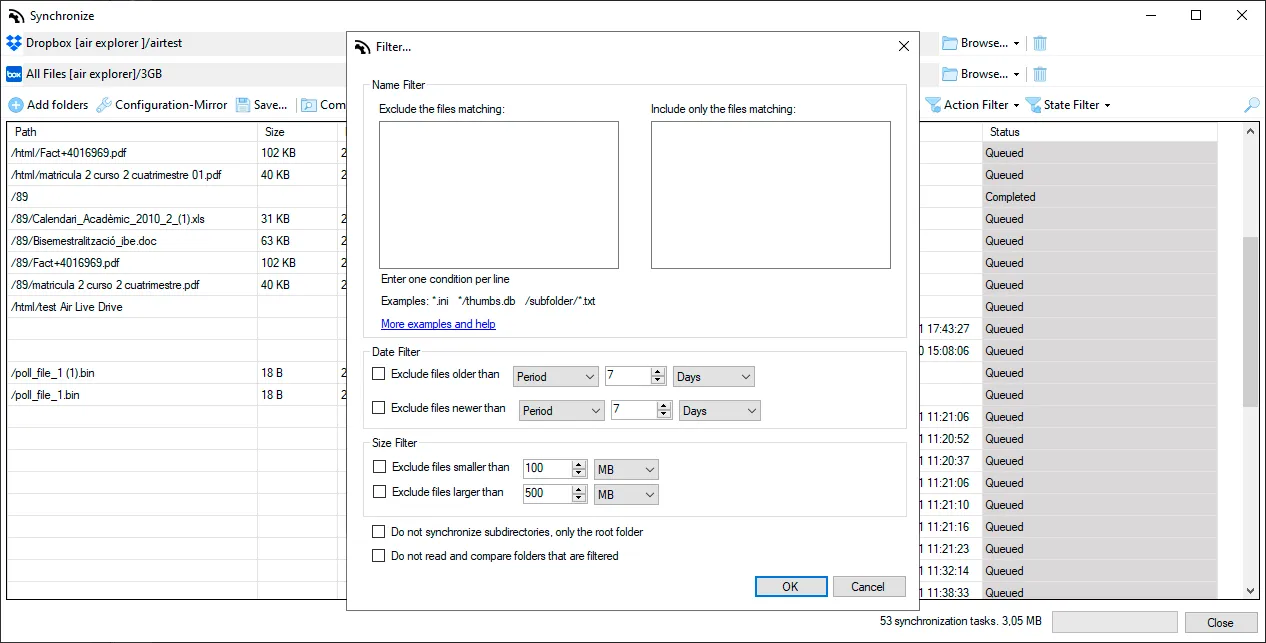
Selective sync intelligence excludes:
- node_modules/, .git/, _pycache_/
- Thumbnails, previews, temp files
- Custom patterns via regex or wildcards
Compliance toolkit generates:
- Complete sync history with before/after file lists
- Conflict resolution reports
- Bandwidth usage analytics
Scaling scenarios:
- Sync 50TB marketing assets across 5 clouds simultaneously
- Daily differential syncs (only changed files since last run)
- Cross-region compliance transfers with automatic retry logic
Data engineers report cutting manual transfer time from 40 hours/week to 90 minutes. Marketing teams maintain pixel-perfect asset sync across global teams.
Getting Started Instantly
Zero-risk onboarding:
- Download Air Explorer (Windows/Mac)
- Connect your first cloud accounts
- Navigate in your clouds
- Drag&drop files between clouds
Perfect for data engineers tired of CLI debugging, marketing ops teams managing global assets, and IT admins needing reliable automation without developer dependencies.
Start your first multi-cloud sync today
Future-Proof Your Data Strategy
Air Explorer transforms multi-cloud complexity into visual simplicity. Teams stop fighting syntax errors and failed cron jobs, focusing instead on business value. The future of cloud storage isn’t choosing one provider, it’s mastering them all from one drag-and-drop interface that just works.
You can check more information about more features here:
-Schedule Your Backups with the Task Scheduler for Windows and Mac
-How to Transfer Files from Google Drive to OneDrive Without Downloading Them
-How to configure multiple sync tasks