

The use of cloud storage has become an essential part of both personal and professional data management. Whether you’re storing family photos or enterprise reports, cloud services offer a reliable, accessible, and scalable solution. As digital ecosystems evolve and users adopt multiple cloud platforms, the need to move files efficiently between these services has grown. Enter Air Explorer, a powerful tool designed to make cloud-to-cloud transfers faster and easier than ever.
Why we save files in the cloud
Cloud storage brings a wide range of benefits, revolutionizing the way we handle data:
- Accessibility: Retrieve files anytime, anywhere.
- Security & backup: Protect data against hardware failures or loss.
- Collaboration: Share and edit documents with teams remotely.
- Storage optimization: Free up physical device space.
- Scalability: Expand storage as needed without hardware upgrades.

Why transfer files cloud-to-cloud?
As our digital workflows become more cloud-centric, several practical reasons make cloud-to-cloud transfer a necessity:
- Switching providers: Migrating to a cloud service with better features or pricing.
- Consolidating data: Organize scattered files across multiple clouds.
- Collaboration needs: Align data with a team’s preferred platform.
- Backup strategies: Duplicate files to different clouds for added security.
- Freeing up space: Move data from limited storage clouds to larger ones.
What is Air Explorer?
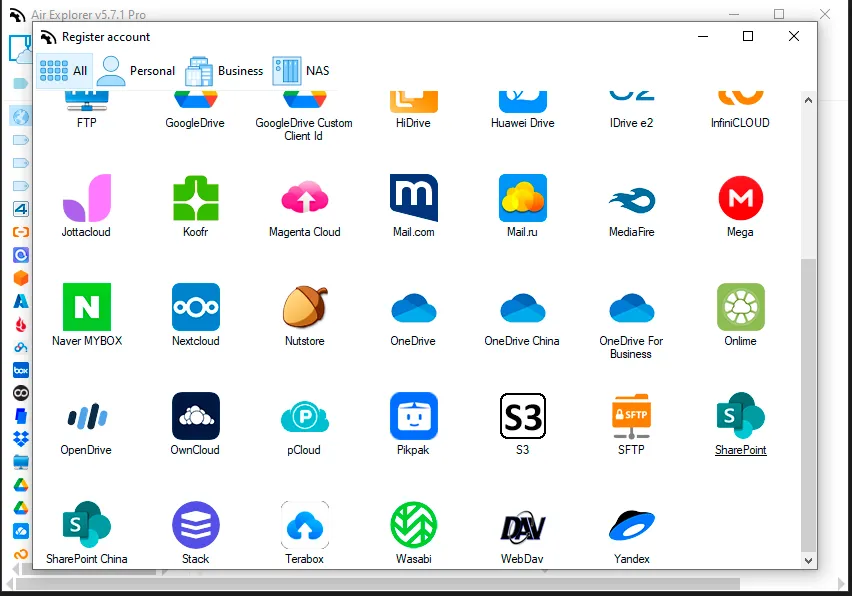
Air Explorer is a versatile tool that allows users to manage multiple cloud services through a unified interface. With support for major platforms such as Google Drive, Dropbox, OneDrive, Mega, Box, and many others, it simplifies the process of accessing and transferring files across clouds.
How to transfer files cloud-to-cloud using Air Explorer
- Step 1: Install Air Explorer and connect your cloud accounts.
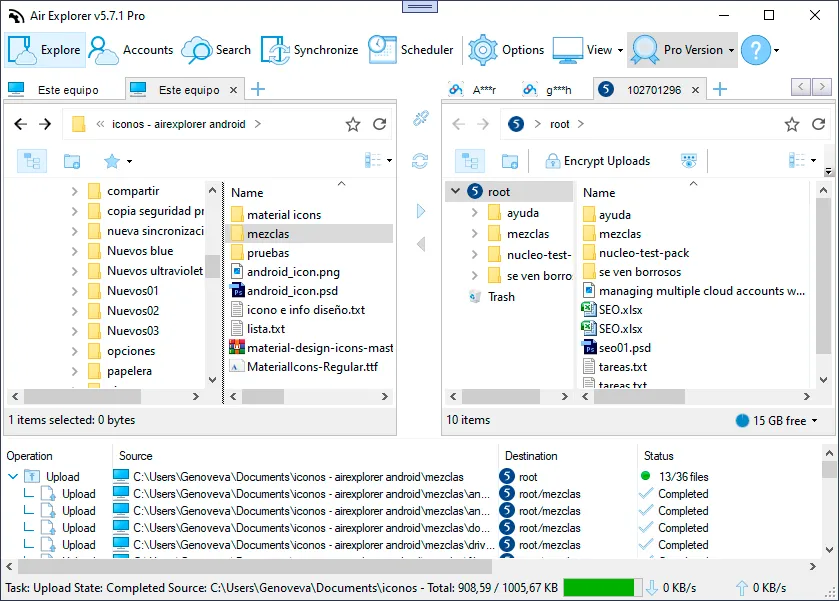
- Step 2: Open a dual-pane window to see two cloud services side by side.
- Step 3: Drag and drop files between clouds or schedule transfers.
- Step 4: Use synchronization features to keep folders up to date.
- Step 5: Monitor progress through detailed transfer reports.
Advantages of Using Air Explorer
| Feature | Benefit |
|---|---|
| Multi-cloud support | Seamlessly manage multiple accounts in one place |
| Simple interface | No tech expertise required to navigate and operate |
| Encryption options | Keep your files safe during transfers |
| Scheduled syncs & backups | Automate data protection and organization |
| Cloud indexing | Search files across all services instantly |
| No need to download locally | Faster transfers that bypass your device |
Conclusion
Efficient cloud-to-cloud transfers are more than just a convenience, they’re a necessity in today’s multi-platform landscape. Air Explorer empowers users to manage and migrate data with ease, offering a streamlined interface, robust features, and unmatched compatibility. If you’re juggling multiple cloud accounts, Air Explorer just might be your new favorite productivity tool.
You can check more information about more features here:
-Save and sync files to TeraBox
-Manage your cloud files using the command line
-Add your cloud accounts in one app