
Air Explorer vs Air Cloud Analyzer: Which Tool Does Your Cloud Storage Need?

If you manage multiple cloud storage accounts, you’ve likely come across two similarly named tools that solve completely different problems: Air Explorer and Air Cloud Analyzer. While both centralize multiple clouds into a single desktop interface, one is built for moving and syncing files, while the other is designed for analyzing and cleaning up your storage space.

What Each Tool Does
Air Explorer for Windows and Mac is a multi-cloud file manager that lets you transfer, sync, and back up files across more than 45 different services (Google Drive, OneDrive, Dropbox, Amazon S3, FTP/SFTP, Mega, Box, and more) without needing to download files to your local disk, since processing happens “on the fly”. Air Cloud Analyzer, on the other hand, is a desktop tool for Windows and Mac focused on scanning your cloud storage, generating visual usage graphs, and helping you spot large files, duplicates, or hidden space you can free up.
While Air Explorer focuses on transferring, uploading, and syncing files, Air Cloud Analyzer is specifically designed to scan and create visual representations of storage usage.
Advantages of Air Explorer
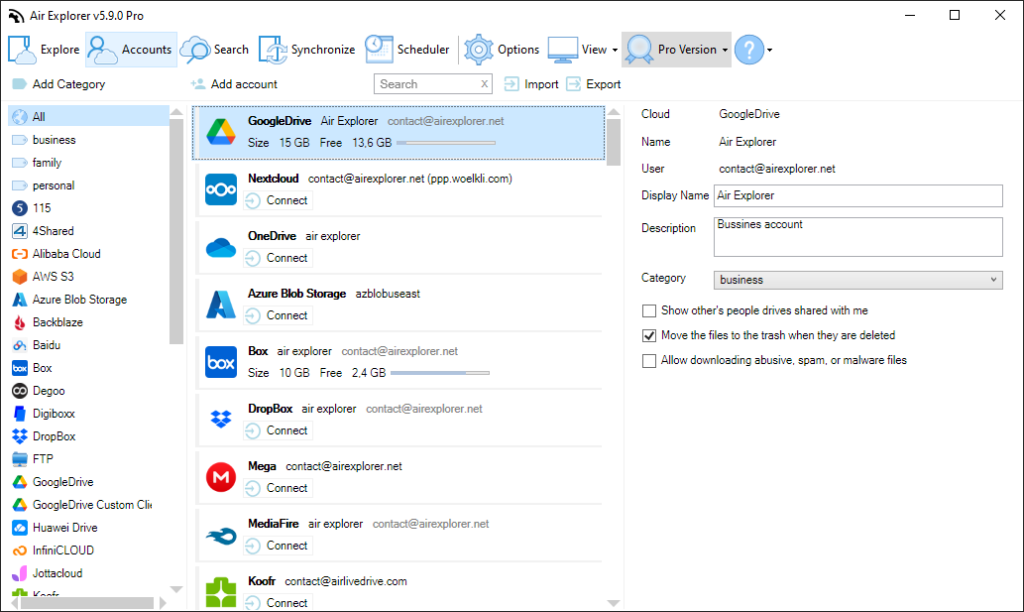
Air Explorer shines when the goal is moving, organizing, or protecting files across different cloud platforms. Its main strengths include:
- Support for more than 45 different cloud services, including less common options like Yandex, Baidu, TeraBox, or SharePoint.
- Direct transfers between clouds without routing through intermediate servers, which speeds up the process and reduces local bandwidth use.
- Advanced sync modes (mirror, mirror updated, bidirectional, customized) with savable, reusable tasks for recurring jobs.
- A task scheduler for unattended backups and syncs on both Windows and Mac, ideal for anyone who doesn’t want to repeat processes manually.
- Encryption on upload, plus command-line management for advanced users or businesses seeking automation.
- A search function that scans files across all connected accounts simultaneously.
- An intuitive Windows Explorer-style interface with tabs and a split view that makes it easy to copy and move files between clouds.
Advantages of Air Cloud Analyzer
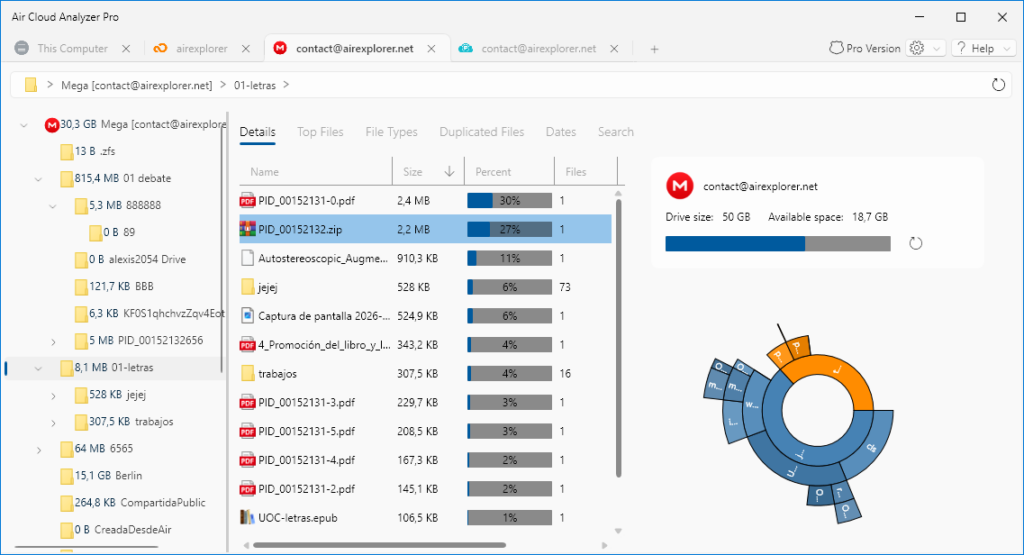
Air Cloud Analyzer solves a different problem: understanding and optimizing the space you already occupy across your clouds. Its main advantages are:
- Graphical visualization of storage usage, clearly showing which folders or file types consume the most space.
- Detection of large files and duplicates across multiple cloud accounts without needing to download them locally.
- A single dashboard for managing and comparing the status of all your connected accounts.
- A specific focus on cleanup and space recovery, something Air Explorer doesn’t offer as a core feature.
Use Cases for Each Tool
Choosing between the two depends on which problem you want to solve first: moving data, or understanding how it’s occupying space.
Complementary, Not Competing Tools
In practice, both tools can coexist in the same workflow: use Air Cloud Analyzer to spot files that are unnecessary or duplicated, then use Air Explorer to move, reorganize, or back up what actually matters across your different accounts. If your priority is active management and multi-cloud syncing, Air Explorer is the natural choice; if you’re looking to declutter and free up space first, Air Cloud Analyzer covers that specific need.
You can check more information here:
-Air Cluster vs Air Explorer
-Air Explorer vs. Air Live Drive
