
Talk to Your Cloud: Managing Google Drive, Dropbox & OneDrive with Natural Language Using Air Explorer’s AI Skills

What if you could organize your entire cloud storage (uploads, searches, syncs, transfers) just by typing a sentence? With Air Explorer’s AI Skills, that’s exactly what you can do. You tell an AI assistant what you want in plain English, and Air Explorer executes it across all your connected clouds.
What Are Air Explorer AI Skills?
Air Explorer ships an AI Skill that lets AI assistants operate your cloud storage for you (list, search, upload, download, move, copy, sync and share files across all your connected clouds) by driving Air Explorer’s command line.
Instead of clicking through folders or writing scripts, you simply ask something like: “Upload every PDF in my Downloads folder to the Backup folder of my Google Drive.” The assistant then runs the right Air Explorer commands on your PC automatically.
The skill is built on the open Agent Skills standard (SKILL.md), which means the same skill works with the three major local AI assistants: Claude Code, ChatGPT/Codex, and Google Antigravity.
Why This Changes Everything for Multi-Cloud Management
Air Explorer already centralizes over 50 cloud services (Google Drive, OneDrive, Dropbox, Mega, Box, S3, WebDAV, FTP/SFTP, and many more) into a single interface. AI Skills add a conversational layer on top of that power:
- No memorizing commands: The AI builds the correct command-line syntax for you.
- No repetitive clicking: One sentence can trigger a batch upload, a cloud-to-cloud transfer, or a full mirror sync.
- Safer operations: The assistant asks for confirmation before deleting or overwriting files.
- Works with your existing accounts: The skill never sees your cloud passwords, it uses accounts you’ve already signed in to inside Air Explorer.
Requirements
Before installing the skill, make sure you have:
- Air Explorer Pro installed and activated on your Windows PC.
- The command line enabled: Options → Command line → Enable command line support.
- A local AI assistant that can execute commands on your computer: Claude Code (CLI or the Claude Code tab of Claude Desktop), the ChatGPT desktop app / Codex CLI, or Google Antigravity.
Why a local assistant? Because the skill runs AirExplorerCmd.exe on your PC, the assistant needs permission to execute local commands, a purely web-based chat can’t use it.
Installation in Three Steps
Getting started takes less than a minute:
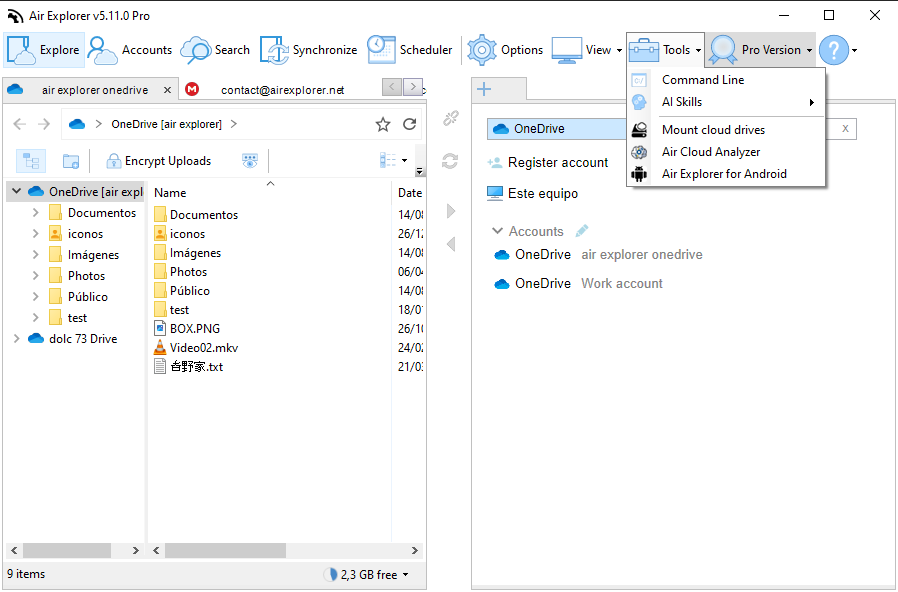
- Open Air Explorer and go to Tools → AI Skills.
- Pick your assistant: Install in Claude Code, Install in ChatGPT, or Install in Antigravity. There’s also a Manual installation option that opens the folder containing the skill package (
air-explorer-cli.zip) so you can add it by hand to any Agent Skills–compatible tool. - Restart your assistant so it detects the new skill. If the command line is disabled, Air Explorer offers to enable it for you.
To verify everything works, just ask: “List my Air Explorer accounts.” The assistant will show your configured clouds along with their aliases, the names you use to refer to each account.
What Can You Actually Ask For?
Practically everything the command line can do:
Browsing and searching
- “What’s in the root of my Dropbox?”
- “Find every invoice PDF larger than 2 MB in my OneDrive.”
- “Search my Google Drive for files modified after 2026-01-01.”
Uploads and downloads
- “Upload C:\Reports\2026 to the Reports folder of mydrive.”
- “Download the Photos folder from my Dropbox to D:\Backup.”
Cloud-to-cloud transfers
- “Copy everything in Archive from my Dropbox to my Google Drive.” — the transfer happens between clouds without downloading everything manually.
Organization
- “Create a 2026 folder in mydrive and move all .xlsx files from Inbox into it.”
- “Rename draft.docx to final.docx in my OneDrive.”
Sharing and permissions
- “Give read access to alice@example.com on the Shared folder of my Google Drive.”
- “Create a shareable link to report.pdf in my Dropbox.”
Synchronization
- “Mirror C:\Work to the Work folder of mydrive.”
- “Run my saved sync called NightlyBackup.”
You can also check storage with “How much free space is left on each of my accounts?”.

A Real Example: Mirror Sync with a Safety Check
One of the most powerful, and most careful, workflows is synchronization. Here’s how a typical conversation goes:
You: Mirror my local folder C:\Work\Project to the Project folder of mydrive.
Assistant: ⚠️ A Mirror sync makes the destination an exact copy of the source: files that exist on mydrive but not locally will be deleted. I’ll compare first so you can see what would change, no files moved yet.
The assistant runs the sync in compare-only mode, reports “24 files to upload, 3 to update, 2 to delete,” and only proceeds once you confirm. You can even ask it to keep an HTML report of the operation.
This safety-first behavior applies throughout: the assistant always asks for confirmation before deleting or overwriting, and warns you that cloud deletions may be permanent depending on the provider.
Under the Hood: The Command Reference
Every natural-language request maps to one of Air Explorer’s command-line commands. The assistant builds them for you, but here’s the summary:
| Command | Purpose |
|---|---|
accounts | List configured cloud accounts and their aliases |
dir | List files/folders in a cloud folder |
search | Search with filters (type, size, date, …) |
quota | Show used / free space |
upload / download | Local ⇄ cloud transfers |
transfer | Copy files from one cloud account to another |
copy / move / rename / delete / mkdir | Operate within one cloud |
startsync / runsavedsync | Ad-hoc or saved synchronization |
permissions | Show / grant / remove sharing permissions |
sharelink | Create a shareable link for a file or folder |
multicmd | Run a batch of commands from a file |
The assistant also handles path rules automatically: cloud paths use forward slashes and start with the root folder name (root/Documents/report.pdf), while local Windows paths use backslashes (C:\Users\me\Documents).
Tips and Troubleshooting
- “Command line support is disabled” → Enable it in Options → Command line, or let the install dialog turn it on.
- Assistant can’t find the skill → Restart the assistant; some only list skills at startup
- “Alias not found” → Ask “list my accounts” to get the exact alias, or add the account in Air Explorer’s GUI.
- CLI password set → If you configured a command line password in preferences, the assistant will ask you for it when needed.
Conclusion
Air Explorer’s AI Skills turn cloud file management into a conversation. Combined with support for 50+ storage services, you now have a genuinely unified way to search, transfer, sync and share files across Google Drive, Dropbox, OneDrive and beyond, using nothing more than plain language through Claude Code, ChatGPT or Antigravity.
You can check more information here:
-How to Plan and Run Large Data Migrations
-How to Move Files Between Cloud Accounts Faster and With Less Manual Work
-7 S3-Compatible Cloud Storage Services You Can Manage from One Window
