
How to Move Files Between Cloud Accounts Faster and With Less Manual Work
Moving files between cloud accounts should not feel like a repetitive admin task. When teams rely on several platforms for storage, backup, collaboration, or archiving, manual transfers quickly become slow, fragmented, and error-prone. Air Explorer addresses that problem by letting users manage multiple cloud services in one interface, automate recurring jobs, and run direct transfers between providers without relying on a messy tab-by-tab workflow.
Why manual cloud transfers slow teams down
Many users still move files the long way: download from one cloud, save locally, then upload to another service. That process adds extra steps, depends on local disk space, and creates more opportunities for missed folders, duplicate work, or delayed updates.
The issue becomes bigger when transfers are repetitive. Weekly backups, monthly archives, client-delivery folders, and shared team handoffs often follow the same pattern again and again, but users still perform them manually as if each transfer were unique.
That kind of workflow hurts productivity in several ways:
- It takes longer than necessary to complete routine transfers.
- It forces users to switch between multiple cloud interfaces.
- It increases the risk of human error in recurring tasks.
- It makes it harder to scale multi-cloud operations as data grows.
Direct cloud-to-cloud transfers save time
One of the most practical ways to reduce manual work is to transfer files directly between cloud accounts. Air Explorer supports direct file movement between supported cloud services, so users can copy, paste, drag, and drop files across providers from a unified interface.
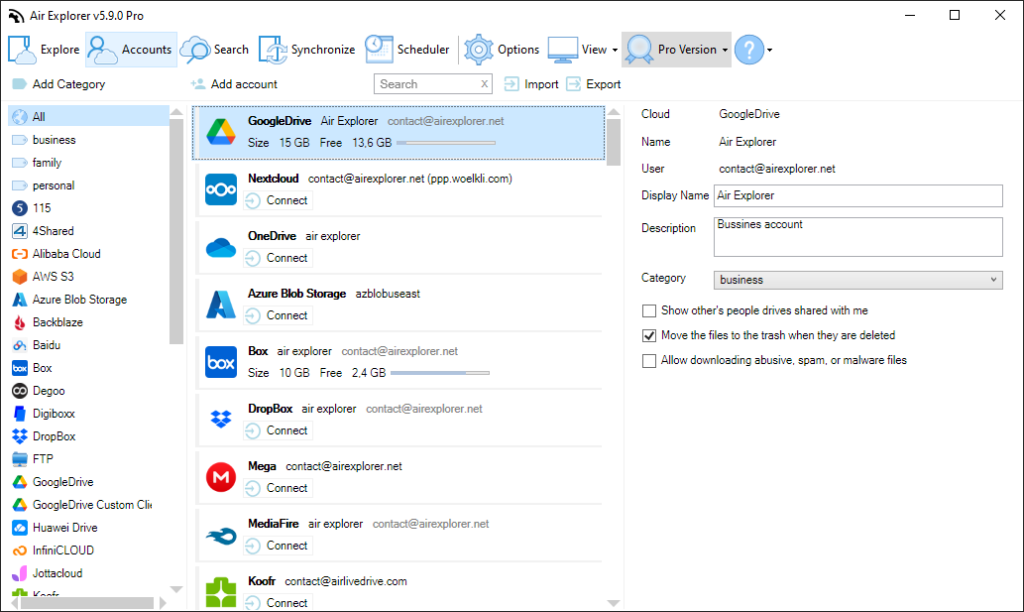
That matters because it removes unnecessary friction from the process. Instead of treating your computer as a temporary bridge for every transfer, you can work across cloud accounts more efficiently and keep operations centralized in one desktop app.
This is especially useful for workflows such as:
- Moving project folders from Google Drive to Dropbox.
- Organizing backups from OneDrive to another cloud destination.
- Migrating content between storage providers.
- Managing multiple business or client cloud accounts side by side.
For companies that handle files across different services, a direct transfer model can cut down transfer time and reduce operational clutter.
Automation reduces repetitive work
The biggest productivity gains often come from removing repetitive actions. Air Explorer includes built-in scheduling and reusable task support, which makes it easier to automate file transfers, synchronizations, and backups that need to happen regularly.
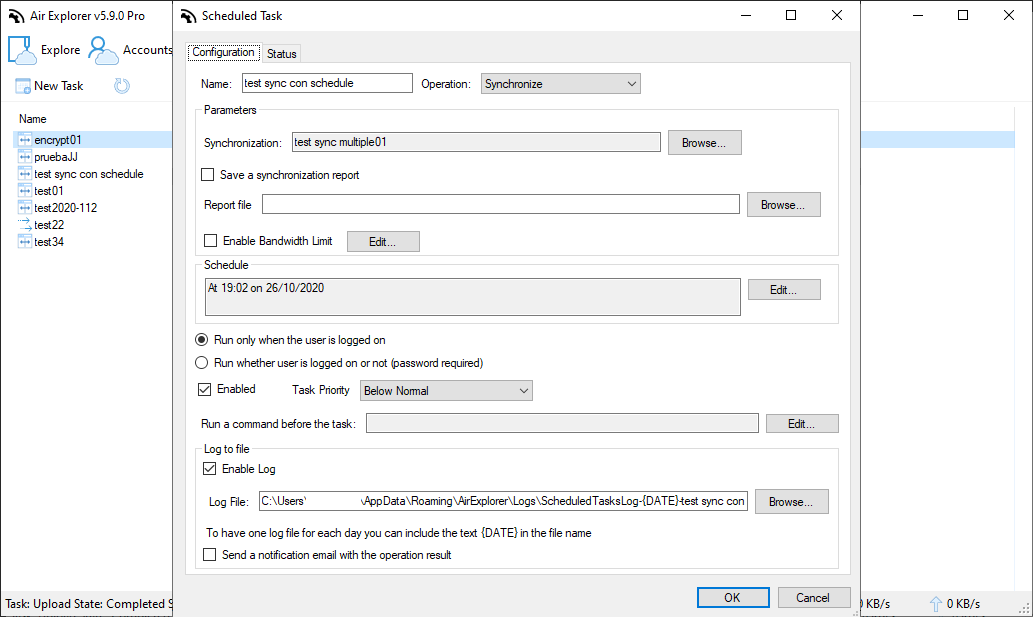
Instead of rebuilding the same workflow each time, users can save a task once and schedule it to run unattended on a daily, weekly, or custom basis. That creates a more reliable process for teams that depend on routine file movement across clouds.
Examples of tasks that benefit from automation include:
- Scheduled backups to a secondary cloud account.
- Recurrent folder synchronization between departments or locations.
- End-of-day document transfers for reporting or archiving.
- Ongoing cloud-to-cloud migration batches.
Automation is not only about convenience. It also improves consistency, because the transfer process no longer depends on someone remembering to do it manually every time.
Scheduled sync helps keep files aligned
In many cases, the goal is not a one-time transfer but continuous alignment between folders. Air Explorer provides synchronization options for cloud-to-cloud and PC-to-cloud workflows, with multiple sync modes that can be saved and scheduled for future use.
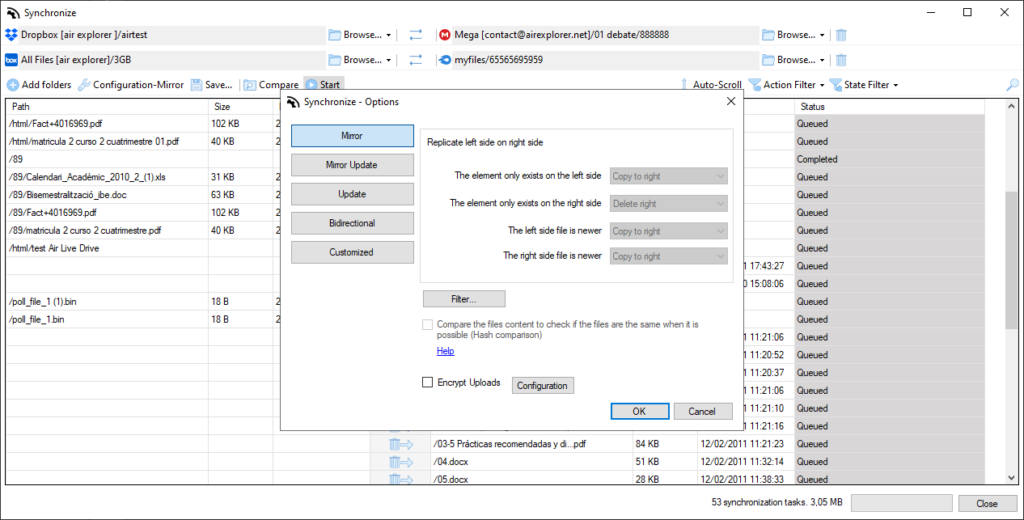
That gives users more control over how files stay updated across locations. For example, a team can maintain mirrored folders for backup, use bidirectional sync for collaboration, or configure recurring sync jobs for distributed storage environments.
This is valuable when:
- Teams share files across multiple platforms.
- Backups must stay current without manual intervention.
- Departments need predictable and repeatable file updates.
Monitoring improves reliability
Automation works best when users can track what is happening. Air Explorer includes progress visibility and task review features that help users monitor transfers and confirm that migrations or synchronization jobs completed as expected.
That operational visibility matters in business settings. When teams move large volumes of files or run scheduled tasks in the background, they need to detect issues early, confirm completion, and maintain confidence in their backup or sync routines.
Monitoring supports productivity because it helps users:
- Review transfer progress.
- Check whether scheduled jobs ran correctly.
- Reduce uncertainty around unattended tasks.
Air Explorer for multi-cloud productivity
Air Explorer is designed for users who need to manage multiple cloud storage accounts from one place. Its core value is not just access to many providers, but the ability to combine direct transfers, synchronization, scheduling, and centralized management into a more efficient workflow.
For IT teams, agencies, freelancers, and businesses with distributed storage, that means less time spent on file logistics and more time focused on actual work. Repetitive transfer steps become reusable tasks, multi-cloud movement becomes easier to control, and routine operations become more scalable.
FAQs
What is the fastest way to move files between cloud accounts?
A faster approach is to use direct cloud-to-cloud transfers instead of downloading files locally and uploading them again. Air Explorer supports direct transfers between supported cloud services from one interface.
Can Air Explorer automate recurring cloud transfers?
Yes. Air Explorer includes a built-in scheduler that lets users save transfer, sync, and backup tasks and run them on a recurring schedule.
Does Air Explorer support cloud synchronization?
Yes. Air Explorer supports synchronization between cloud folders and includes modes such as mirror, updated, bidirectional, and customized sync.
Why is monitoring cloud transfers important?
Monitoring helps users confirm that automated tasks completed correctly, spot issues earlier, and maintain control over backup, migration, or sync workflows. Air Explorer provides progress and task visibility for this purpose.
Who benefits most from Air Explorer?
Air Explorer is useful for businesses, IT teams, agencies, and power users who manage files across multiple cloud accounts and want to reduce manual work through automation and centralized control.
You can check more information here:
-7 S3-Compatible Cloud Storage Services You Can Manage from One Window
-Top MultCloud alternative: Air Explorer
-How to automate cloud backups
