
Download PikPak files and folders to your PC or move them to other clouds
Air Explorer, the multicloud manager
PikPak
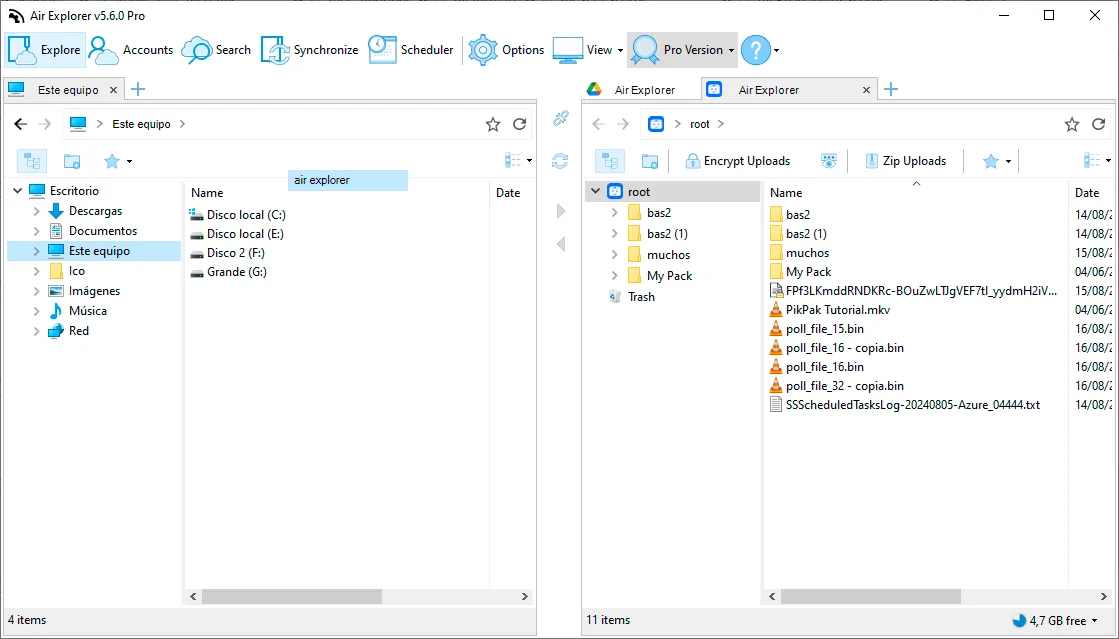
Downloading a whole PikPak folder, subfolders included, takes a single drag in Air Explorer: add your PikPak account, open it next to a folder on your computer and drag the folder across. If the connection drops, the download picks up where it left off, and you can also send the files straight to Google Drive, OneDrive or any other cloud. Air Explorer is free for Windows and Mac, and you don't need to sign up.

How to download files and folders from PikPak
- Download Air Explorer for Windows or Mac and open it.
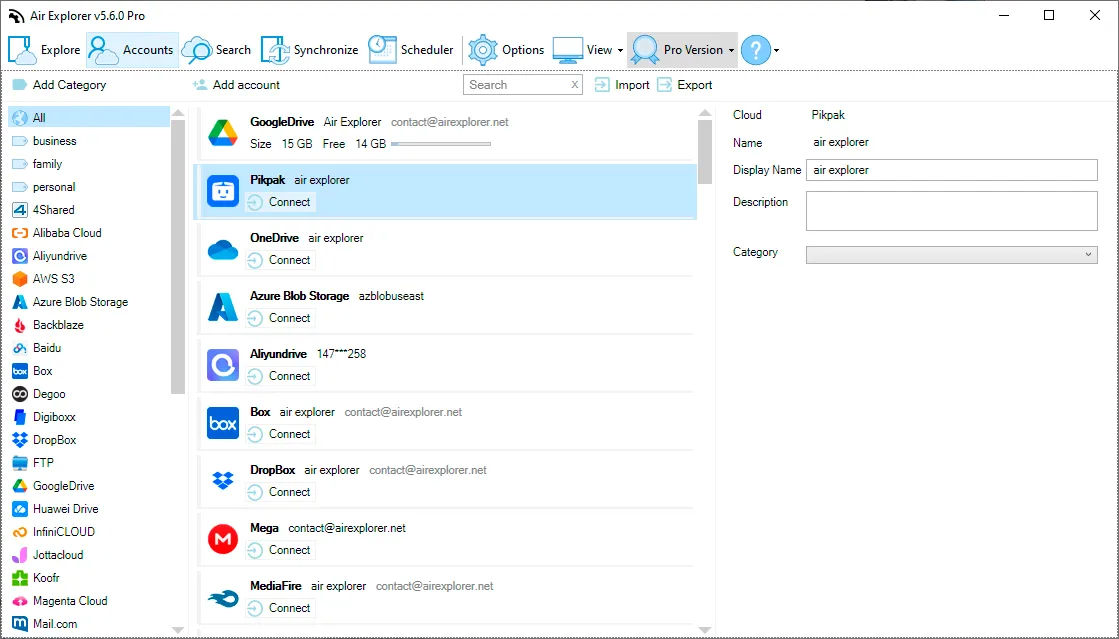
- Add your PikPak account. In Accounts → Add account, choose PikPak and enter your PikPak email and password. They're saved encrypted on your computer.
- Open PikPak in one pane and a folder on your computer (or another cloud) in the other.
- Select the files or folders you want. You can select a whole folder: everything inside it is downloaded too.
- Drag them to your computer, or use Copy and Paste. Follow each file in the task list; if a download is interrupted, Air Explorer resumes it.
What else you can do with PikPak in Air Explorer
Move to other clouds
Move PikPak files to Google Drive, OneDrive, MEGA or TeraBox without downloading them by hand first.
Play videos
Watch PikPak videos without downloading them. VLC is recommended.
Share links
Create share links for your PikPak files and folders.
Back up and sync
Sync a PC folder with PikPak, or PikPak with another cloud.
Scheduled syncsPro
Run syncs every day or week without opening the program, or automate them with the command line.
Several accounts and encryptionPro
Manage several PikPak accounts and encrypt files before upload. The free version allows one account per cloud.
Ways to download your PikPak files
| Method | How it works | Good for | Limitations |
|---|---|---|---|
| PikPak app or website | Download files from the app or the browser | A few files | Going folder by folder; no transfers to other clouds |
| rclone | Command-line sync tool | Technical users | Command line only, no interface; set up in the terminal |
| Air Explorer | Desktop app: drag whole folders to your PC or to another cloud. Free to download, transfer and sync | Large folders, videos, several clouds | The transfer uses your computer's internet connection while it runs |
PikPak questions
How do I download a whole folder from PikPak?
Open PikPak in Air Explorer, select the folder and drag it to a folder on your computer. Air Explorer downloads all its files and subfolders.
Can I download PikPak videos?
Yes, like any other file. If you just want to watch them, choose Play and Air Explorer streams the video to your media player without downloading it.
What happens if a download is interrupted?
Air Explorer resumes PikPak downloads from where they stopped, so you don't have to start large files again.
Can I download from PikPak without an account?
No. Air Explorer works with your own PikPak account. If someone shares a PikPak link with you, add it to your PikPak from the PikPak app or website first, and then download it with Air Explorer.
Can I move PikPak files to Google Drive or TeraBox?
Yes. Open PikPak and the other cloud side by side and drag the files. To move files into PikPak, see how to migrate files from other clouds to PikPak.
Can I share PikPak files from Air Explorer?
Yes. Right-click a file or folder and choose Share Link.
Does it work on Mac and Android?
Yes. PikPak is supported in Air Explorer for Windows, Mac and Android. See using PikPak with Air Explorer for Mac.
Is it free?
Yes, and you don't need to create an Air Explorer account: you download it and add your cloud accounts. The free version downloads, transfers and syncs PikPak files, with one account per cloud. Air Explorer Pro adds unlimited accounts, scheduled syncs, encryption and the command line.
Download your PikPak files today
Air Explorer is free for Windows and Mac. Upgrade to Pro when you need several accounts, scheduled backups or encryption.
Storage services supported by Air Explorer
With Air Explorer, manage the transfer, synchronization and security of your data across more than 40 cloud storage services.


